 Tweet
Tweet
Channels Manager
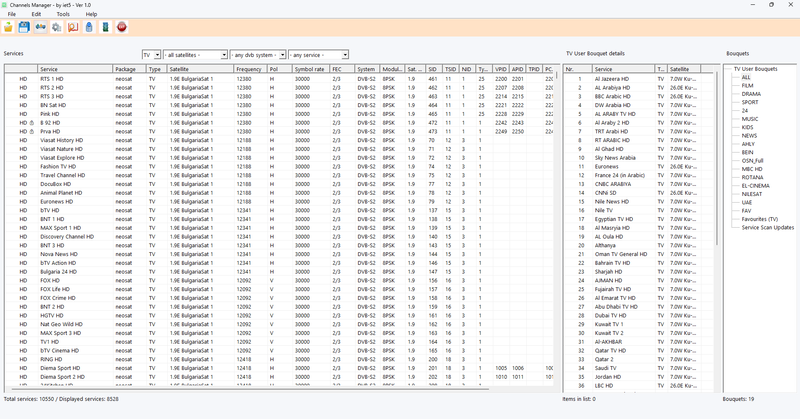
Channels Manager is a professional, lightweight, and high-performance tool designed for managing channel lists and bouquets for satellite receivers running Enigma2, Dreambox, VU+, and compatible Linux-based systems. The application has been developed to provide users with a complete and efficient environment for organizing, editing, and maintaining channel data with ease, while offering all the essential tools required to manage receiver channel files directly from a PC.
The program has been developed entirely in C using the native Win32 API for Windows, without relying on heavy frameworks, embedded browsers, or large third-party libraries. As a result, it delivers fast startup times, instant responsiveness, and extremely low CPU and memory usage, making it suitable for both older and modern computers.
Channels Manager allows users to download channel files from their receiver, edit and organize them locally on the PC, and then upload the modified files back to the device over the network using FTP and receiver connection settings. It also provides a comprehensive set of channel and bouquet management tools that simplify the creation and maintenance of professional channel lists.
Thanks to its lightweight and efficient architecture, Channels Manager delivers excellent performance when handling large channel databases. Files are opened quickly, channel information is displayed instantly, and navigation and searching through thousands of services remain smooth without impacting overall system performance.
Key Features
Lightweight and fast, built entirely in C using the native Win32 API.
Fast startup and high responsiveness with minimal resource consumption.
Manage TV channels, radio channels, and data services from a single interface.
Download channel files from the receiver and upload them back easily over the network.
Support for multiple profiles to manage several receivers or connection settings.
Save connection information and working preferences for quick future access.
Easily edit, organize, and manage bouquets and channel lists.
Create new bouquets and reorganize channels within them.
Delete, move, copy, and sort channels between different bouquets.
Full support for essential Enigma2 files, including:
services
bouquets
satellites.xml
Display detailed channel and service information.
View channel parameters such as:
Frequency
Satellite
Broadcast system
Symbol rate
SID
Other service-related information
Fast search capabilities across channels and bouquets.
Advanced filtering by:
Channel type
Satellite
DVB system
Service status
Test receiver connectivity before starting download or upload operations.
Verify login credentials before executing file transfers.
Option to show or hide passwords while entering connection details.
Clean and organized interface designed to efficiently manage large channel databases.
Simplifies the creation and editing of professional channel lists.
Reduces the time required to organize channels and bouquets compared to traditional methods.
Native Windows interface design for improved stability and performance.
Suitable for both beginners and advanced users.
Performance and Stability
Performance and stability were top priorities during development. The application is built entirely as native code, without additional software layers that could negatively affect speed or responsiveness. This results in faster file loading, smoother interface operation, and rapid navigation through channels and bouquets, even when working with large channel databases.
The user interface has also been designed to be practical and intuitive, allowing quick access to essential functions without unnecessary complexity or excessive configuration.
Conclusion
Channels Manager is a professional, fast, and lightweight application for managing and organizing channel lists and bouquets for Enigma2, Dreambox, VU+, and compatible receivers directly from a PC. Developed in C using the native Win32 API, it provides excellent performance, stability, and extremely low resource consumption. The software includes all the tools needed to download channel files, edit and organize bouquets, search and filter services, test connections, and upload changes back to the receiver safely and efficiently over the network. It is an ideal solution for anyone who wants to create, manage, and maintain professional channel lists quickly, efficiently, and without unnecessary complexity.
Channels Manager is a professional, lightweight, and high-performance tool designed for managing channel lists and bouquets for satellite receivers running Enigma2, Dreambox, VU+, and compatible Linux-based systems. The application has been developed to provide users with a complete and efficient environment for organizing, editing, and maintaining channel data with ease, while offering all the essential tools required to manage receiver channel files directly from a PC.
The program has been developed entirely in C using the native Win32 API for Windows, without relying on heavy frameworks, embedded browsers, or large third-party libraries. As a result, it delivers fast startup times, instant responsiveness, and extremely low CPU and memory usage, making it suitable for both older and modern computers.
Channels Manager allows users to download channel files from their receiver, edit and organize them locally on the PC, and then upload the modified files back to the device over the network using FTP and receiver connection settings. It also provides a comprehensive set of channel and bouquet management tools that simplify the creation and maintenance of professional channel lists.
Thanks to its lightweight and efficient architecture, Channels Manager delivers excellent performance when handling large channel databases. Files are opened quickly, channel information is displayed instantly, and navigation and searching through thousands of services remain smooth without impacting overall system performance.
Key Features
Lightweight and fast, built entirely in C using the native Win32 API.
Fast startup and high responsiveness with minimal resource consumption.
Manage TV channels, radio channels, and data services from a single interface.
Download channel files from the receiver and upload them back easily over the network.
Support for multiple profiles to manage several receivers or connection settings.
Save connection information and working preferences for quick future access.
Easily edit, organize, and manage bouquets and channel lists.
Create new bouquets and reorganize channels within them.
Delete, move, copy, and sort channels between different bouquets.
Full support for essential Enigma2 files, including:
services
bouquets
satellites.xml
Display detailed channel and service information.
View channel parameters such as:
Frequency
Satellite
Broadcast system
Symbol rate
SID
Other service-related information
Fast search capabilities across channels and bouquets.
Advanced filtering by:
Channel type
Satellite
DVB system
Service status
Test receiver connectivity before starting download or upload operations.
Verify login credentials before executing file transfers.
Option to show or hide passwords while entering connection details.
Clean and organized interface designed to efficiently manage large channel databases.
Simplifies the creation and editing of professional channel lists.
Reduces the time required to organize channels and bouquets compared to traditional methods.
Native Windows interface design for improved stability and performance.
Suitable for both beginners and advanced users.
Performance and Stability
Performance and stability were top priorities during development. The application is built entirely as native code, without additional software layers that could negatively affect speed or responsiveness. This results in faster file loading, smoother interface operation, and rapid navigation through channels and bouquets, even when working with large channel databases.
The user interface has also been designed to be practical and intuitive, allowing quick access to essential functions without unnecessary complexity or excessive configuration.
Conclusion
Channels Manager is a professional, fast, and lightweight application for managing and organizing channel lists and bouquets for Enigma2, Dreambox, VU+, and compatible receivers directly from a PC. Developed in C using the native Win32 API, it provides excellent performance, stability, and extremely low resource consumption. The software includes all the tools needed to download channel files, edit and organize bouquets, search and filter services, test connections, and upload changes back to the receiver safely and efficiently over the network. It is an ideal solution for anyone who wants to create, manage, and maintain professional channel lists quickly, efficiently, and without unnecessary complexity.


Commenta